Draw Bridge Puzzle: Brain Game
- 108.00
- 4,3
- Installazioni
- 50.00M
- Prezzo
- Free
Screenshot
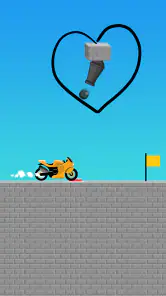
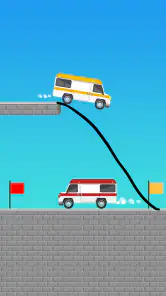
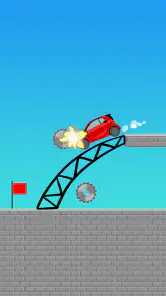
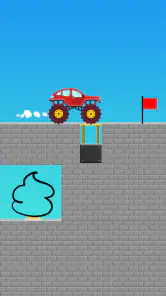
Analisi di Reviewed
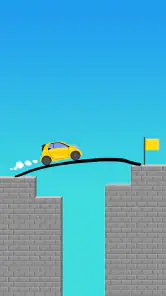
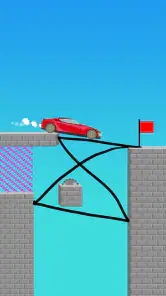
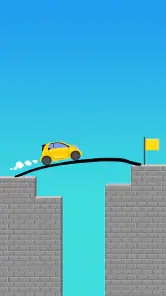
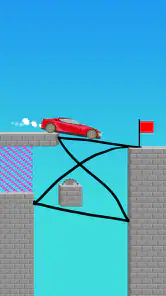
In Draw Bridge Puzzle: Brain Game, the central idea is wonderfully easy to grasp: you draw a route, and the car needs that route to make it through the level. What makes the game worth a closer look is not a complicated control scheme but the small decisions behind each line. A path that looks obvious may not support the car as you expect, so I find myself pausing to consider where the wheels will go rather than simply tracing a road from one side to the other.
That focus gives this free puzzle game a clear identity. It belongs to the brain-teaser side of mobile gaming, where a little planning matters more than quick reflexes. Developed by Brave Labs, it has a 4.3 average from around 47,000 ratings and more than 50 million installs. Those figures suggest broad appeal, but the actual appeal is quite specific: it suits someone who enjoys testing a simple idea, seeing what happens, and adjusting the drawing when the result is not quite right.
Una linea da disegnare, non una strada da seguire
Many mobile puzzles ask you to move pieces through a fixed layout or choose from a set of answers. Here, the distinctive act is drawing the road yourself. That changes how I approach a level: I am not only looking for the correct route, but also deciding what shape might carry the car safely. The drawing is the solution, and its shape is part of the reasoning.
The concept is especially approachable because it does not require learning a long list of controls before getting started. The basic task is visible on the screen, and the challenge comes from interpreting the scene. That makes it easy to pick up for a short break, even if you have not played this kind of game before. At the same time, the simplicity can be deceptive: drawing a line is easy, but anticipating how the car will interact with it takes more care.
I like that this premise encourages experimentation rather than demanding a perfect answer on the first attempt. When a drawing fails, the useful question is not just “What did I do wrong?” but “Which part of my plan was too optimistic?” Perhaps the route needs a gentler shape, or perhaps I tried to solve the whole level with one quick stroke. That little process of forming a hypothesis and revising it is the game’s strongest source of satisfaction.
Dal gesto al ragionamento
In practice, I would treat every drawing as a small construction problem. Before committing to a line, look at the route the car must take and imagine what happens at its awkward points. A sharp turn or an abrupt change in height deserves more attention than a long, straightforward stretch. Even without turning the game into a technical exercise, taking a moment to picture the car’s movement can prevent careless attempts.
A helpful habit is to draw with the difficult section in mind first. If the car needs to cross a gap or reach a higher point, I would plan how to connect that part before filling in an otherwise obvious route. This is more effective than dragging a line across the screen as quickly as possible, because it gives the whole drawing a purpose. The level then feels less like a test of speed and more like a compact problem in cause and effect.
Another useful approach is to change one thing at a time after a failed attempt. If I redraw the entire route in a completely different way, I learn little about why the first version did not work. Keeping most of the idea and adjusting only the uncertain bend or connection makes experimentation more informative. It is a small strategy, but it helps the game feel less like guesswork and makes each retry count.
This is also where the game’s limitation becomes clear. Drawing gives the player freedom, but the experience can still feel trial-and-error heavy when the result does not match what you pictured. Players who want a puzzle with a single, sharply defined solution may find that open-ended drawing less satisfying. I enjoy the freedom most when I can understand how my choice affected the outcome; if I only want an answer that is unambiguous and immediate, a traditional logic grid or fixed-path puzzle may suit me better.
Il momento giusto per una partita
The best everyday use case is a short pause when I want something more engaging than scrolling but do not feel like starting a long game. I can focus on a single drawing, make a plan, and decide whether to try again without needing to settle into a lengthy session. It works well for a commute break, a few quiet minutes between tasks, or a casual turn-taking moment with someone nearby who wants to suggest a different route.
It can also be a nice game to share informally. One person can propose a line while another points out where the car might struggle. That turns the drawing into a small conversation: should the route be straighter, should a tricky section be approached differently, or is the first idea already sensible? The game does not need elaborate multiplayer features to create that kind of shared moment; the visible puzzle itself gives people something concrete to discuss.
For children and families, the low barrier to entry is a point in its favour. Its age rating is PEGI 3, so the classification makes it broadly suitable for young players. I would still expect younger children to benefit from an adult playing alongside them, not because the basic idea is hard to explain, but because talking through why a route might work turns a quick attempt into a more thoughtful puzzle. For adults, the same quality makes it a light mental break rather than a demanding test.
It is less suited to a player who wants deep strategy, a strong narrative, or a large set of systems to master. The appeal is concentrated in the drawing mechanic, so anyone who tires quickly of repeating the same kind of decision may want a puzzle game with more varied rules. Likewise, if you prefer games that reward fast tapping or precise timing, this one asks for a different kind of attention: imagine first, draw second, and accept that the first plan may need revision.
Il compromesso tra libertà e precisione
The same freedom that makes the puzzles approachable can also make them feel imprecise. A drawn road is an intuitive way to express an idea, but it may not always be obvious how much detail a particular level needs. My practical recommendation is to avoid adding extra bends just because they look clever. A simpler route is easier to evaluate, and if it fails, you can identify the point that needs changing without second-guessing a complicated sketch.
There is a balance to strike between planning and overthinking. Spending a few seconds considering the car’s path is useful; trying to calculate every possible movement before drawing can drain the fun from a casual game. I would start with a clear, uncomplicated idea, observe the result, and refine only the part that caused trouble. That approach suits the game’s quick-play nature and keeps retries purposeful instead of frustrating.
Another trade-off is that this is a narrow kind of puzzle. Compared with match-and-clear games, it gives less emphasis to chaining moves or managing a board. Compared with conventional line-drawing puzzles, its particular hook is that the line is meant to function as a route for a car, not merely connect two points. That makes it a better fit for players who enjoy visual problem-solving and physical cause and effect than for those who want a broad collection of unrelated puzzle formats.
The game is free to download, while an in-app purchase is listed at 3,29 € when billing is handled through Play. I would approach that detail simply: you can try the basic experience without paying upfront, then decide whether the game is something you expect to return to. If you are only looking for a brief distraction, there is little reason to treat the purchase as part of the decision to install it. If you play regularly, check the purchase details in the store before buying so you know what the transaction covers.
A chi consiglierei Draw Bridge Puzzle
I would recommend Draw Bridge Puzzle: Brain Game to someone who likes a puzzle they can understand quickly but still wants room to think. It is particularly appealing if you enjoy sketching a solution, watching how it works, and making a better attempt after spotting a weakness. The game also makes sense for parents looking for a simple, age-appropriate activity to share, or for anyone who wants a compact challenge that does not demand a long session.
On the other hand, I would point a puzzle purist who dislikes trial and error toward a more structured alternative, where each move has a clearly constrained answer. Someone seeking a substantial campaign or a constantly changing set of mechanics may also outgrow this game’s central idea. Knowing that beforehand matters: its strength is concentration, not variety. It keeps returning to the pleasure of making a route with your own hand and seeing whether the plan holds up.
The version currently listed is 1.8.5, and the minimum operating system is Android 7.0. The game first appeared on 21 July 2022, which gives it a clear place among established mobile puzzle releases rather than a brand-new experiment. Those details are useful if you are checking device compatibility, but the more important question is whether its core action sounds enjoyable to you: drawing a practical route and learning from the result.
Overall, I see this as a straightforward, friendly brain game with a genuinely engaging central choice. Its best moments come when a small adjustment turns a failed drawing into a workable plan. It is not the right pick for every puzzle fan, especially if you need lots of mechanical variety or dislike uncertain outcomes, but for short, hands-on problem-solving it has a satisfying rhythm. If you like thinking with your eyes and testing an idea rather than merely selecting an answer, I think it is worth a try.
Draw Bridge Puzzle: Brain Game Domande frequenti
Che tipo di gioco è Draw Bridge Puzzle: Brain Game?
Draw Bridge Puzzle: Brain Game è un rompicapo in cui bisogna disegnare un ponte o un percorso per aiutare un veicolo a raggiungere il traguardo. Ogni livello propone una situazione da risolvere con linee e forme create dal giocatore: osservare la scena, intuire come si muoverà il mezzo e scegliere dove tracciare diventa parte della sfida. Le meccaniche e gli obiettivi possono variare in base alla versione dell’app.
Come si gioca e quali abilità mette alla prova?
In genere, si tracciano con un dito le strutture che dovrebbero sostenere o guidare il veicolo, quindi si avvia il livello per verificare se il piano funziona. Non basta disegnare una linea qualsiasi: occorre considerare la distanza, gli ostacoli e il modo in cui il mezzo attraverserà il percorso. Il gioco mette alla prova ragionamento spaziale, pianificazione e capacità di correggere la soluzione dopo un tentativo non riuscito.
Draw Bridge Puzzle: Brain Game è gratuito?
Il gioco può essere scaricato gratuitamente, ma le condizioni possono cambiare a seconda della versione e dello store. Come accade spesso nei giochi per dispositivi mobili, potrebbero essere presenti annunci pubblicitari e, eventualmente, acquisti in-app per ottenere contenuti o vantaggi aggiuntivi. Prima di installarlo, è consigliabile controllare la pagina ufficiale su Google Play o App Store per verificare prezzi, acquisti disponibili e dettagli aggiornati.
È necessario essere connessi a Internet per giocare?
Per i livelli principali, un gioco di questo tipo può spesso essere utilizzato anche senza una connessione continua, ma la disponibilità offline non è garantita per ogni versione. La rete potrebbe servire per caricare annunci, sincronizzare progressi, accedere a funzioni online o scaricare contenuti. Se desideri giocare in modalità aereo o lontano da una connessione, verifica il comportamento dell’app dopo l’installazione e consulta le informazioni riportate nello store.
Su quali dispositivi è disponibile e cosa controllare prima del download?
Draw Bridge Puzzle: Brain Game è destinato ai dispositivi mobili Android e, se pubblicato nella tua area geografica, iOS. La compatibilità precisa dipende dalla versione del sistema operativo, dal modello del dispositivo e dai requisiti indicati nella rispettiva pagina dello store. Prima del download, controlla lo spazio necessario, la data dell’ultimo aggiornamento, le autorizzazioni richieste e le informazioni sulla privacy, così da assicurarti che l’app sia compatibile con il tuo telefono o tablet.
Pro
- Comandi semplici e intuitivi
- adatti anche a brevi sessioni di gioco.
- I livelli iniziali aiutano a capire rapidamente le meccaniche di disegno.
- Risolvere gli enigmi può stimolare la creatività e il ragionamento spaziale.
- La varietà delle situazioni mantiene il gioco più interessante dei rompicapi ripetitivi.
- È adatto a giocatori di diverse età e non richiede abilità di gioco avanzate.
Contro
- La fisica dei ponti può risultare poco prevedibile in alcune soluzioni.
- Alcuni livelli si superano per tentativi
- più che grazie a una logica chiara.
- La difficoltà può aumentare bruscamente senza introdurre nuove meccaniche.
- Chi cerca una storia o una progressione articolata potrebbe trovarlo essenziale.
- Le soluzioni alternative possono rendere alcuni enigmi meno soddisfacenti.
- Categoria
- Rompicapi
- Versione
- 1.8.5